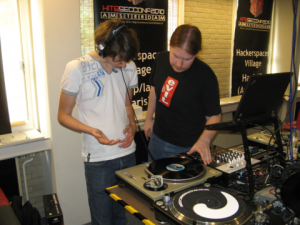
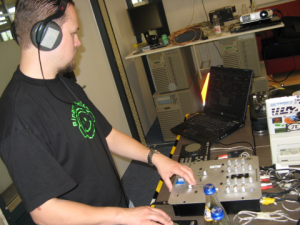
Afgelopen zondag had Hack42 zijn eerste mixsessie, ofwel een DJ Jamsessie. Vier dj’s hebben zich uitstekend vermaakt, gelachen en gestoorde muziek-combo’s ontdekt.
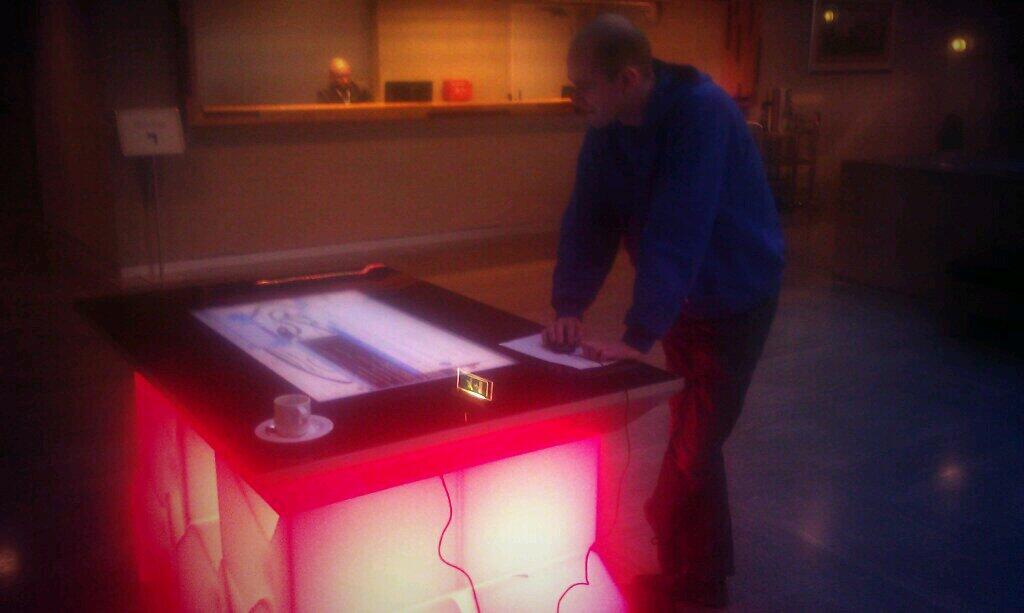
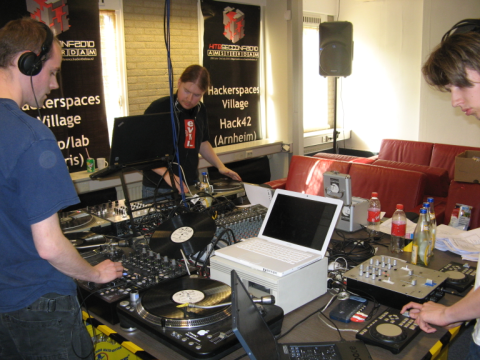
De lezingenruimte was het domein waar we aan het begin van de dag een tafel hebben geïmproviseerd. Met kratten Mate, houten platen en mooie tape ziet het er niet alleen professioneel uit; het is ook nog stevig. Na wat kabels en speakers neergezet te hebben konden we beginnen.
De setup: tafel, dj sets, speakers en gaan!
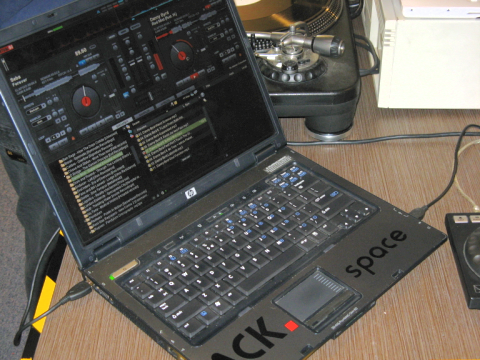
Er stonden 3 mix-setups die ieder op een eigen manier werkte. Zo hadden we bijvoorbeeldTraktor 2, Deckadance en Virtual DJ. Naast deze software hadden we natuurlijk ook vinylmeegenomen en draaide we muziek vanaf USB stick en CD.
De setups waren met elkaar verbonden via een centrale mengtafel. Vanaf daar ging het naar de speakers en opname-laptop. Iedereen kon dus tegelijkertijd horen wat die aan het doen was. In de praktijk hoor je tegelijkertijd twee samengemixte nummers; de kunst is om jouw muziek in te mixen op hetgeen wat al speelt… Als je dat goed doet, geeft het een ontzettende kick.
Je moet dus echt samenwerken voor drops en transities. Dat is lastiger dan in je eentje, maar daarom veel gaver en uitdagender. Ook kan je het moeilijker maken door een andere muziekstijl te gebruiken maar in te mixen op de huidige snelheid. Zo kwamen allerlei soorten muziek langs, ontstonden nieuwe gestoorde combinaties en stijlen.
De boventoon lag op drum & bass, dubstep en drumstep. Ook hebben we house classics aangeraakt, hardcore en populaire dansmuziek. Dat betekent dat er nog genoeg stijlen zijn voor een volgende sessie; zoals hiphop, minimal, top40 classics en glamrock.
Over de volgende keer gesproken; die komt in het najaar. We gaan het zo inrichten dat meerdere setups tegelijkertijd beter kunnen samenwerken en geven meer aandacht aan theorie. Voor het betere gooi en smijtwerk blijft natuurlijk ruimte genoeg; jammen tot het dak eraf gaat! We houden je op de hoogte via de bekende kanalen!
I want to have my own TV station. Preferably I want software that does everything for me; but after some searches it appeared it didn’t exist. Therefore i’ve started a new open-source project codenamed RetroTV.
The aim of RetroTV is to provide a series of practices and software for running your own TV station. It’s not just software; its the whole package including documentation and guidelines/protips. Currently the software is in alpha stage: i’m developing and testing till its good enough to be picked up by the community.
Throughout this series of posts i’ll show documentation and inner workings, as well as results of the project. For todays post i’ll show the status of the project: it’s far beyond the idea stage, its nearly in beta. And we all know Beta is the way to go.
Automated stations
My goal is not at all to bring live programming or anything of decent quality. My goal is to broadcast old school television: the things we watched in our childhood. In Holland there used to be a station called “Kindernet” which broadcasted Ovide, Bassie & Adriaan, Around the Twist and a host of other series. Kindernet appeared to be a completely automated station.
Its formatting was simple: broad cast a show, have some commercials, and display what’s coming up. This project is largely the same thing, except that you can control its content, its format and will also be able to imitate clip stations such as TMF or MTV.
The Format
For automated stations use a similar way to fill up their time. To understand this format, we have to look at the difference between consumers and the station: which translates into formatting. Below tables show a difference between the consumer-level programming and station-level programming.
12:00:00
Some Show
12:30:00
Some Show
13:00:00
Some Show
14:00:00
Some Show
14:30:00
Some Show
15:00:00
Some Show
16:40:00
Some Show
17:00:00
Some Show
12:00:00
Some Show
12:24:00
Leader
12:24:30
Announcements of what is to come
12:25:30
Commercial bumper
12:25:35
Commercials, till next show
12:28:30
Leader
12:28:45
Announcements of what is to come
12:29:40
Leader
Consumer-level programming
Station-level programming
So what I want for our software, is to schedule shows from a consumer perspective. The software should create the station-level programming for me. In our case we don’t have contracts with sponsors and obligations to sell expensive air-time: which is a good thing.
Example schedule
RetroTV can already translate the consumer-programming into station level programming. As a consumer we only need to tell what shows air at what time. Look at the following PHP script: this is all we need in the current version.
$showSchedule = new showSchedule();
$showSchedule->addShow(TIMESLOT_SERIE, "0600", "Penn & Tellers Bullshit!");
$showSchedule->addShow(TIMESLOT_CARTOON, "0700", "Kinder Theater"); // div filmpjes van 5 mins
$showSchedule->addShow(TIMESLOT_CARTOON, "0730", "Samson");
$showSchedule->addShow(TIMESLOT_CARTOON, "0800", "Teddy Ruxpin");
$showSchedule->addShow(TIMESLOT_CARTOON, "0830", "Ovide");
$showSchedule->addShow(TIMESLOT_CARTOON, "0900", "Bassie en Adriaan");
$showSchedule->addShow(TIMESLOT_CARTOON, "0930", "Around The Twist");
$showSchedule->addShow(TIMESLOT_SERIE, "1000", "MythBusters");
$showSchedule->addShow(TIMESLOT_SERIE, "1100", "AVGN");
$showSchedule->addShow(TIMESLOT_SERIE, "1120", "Aqua Teenage Hunger Force");
$showSchedule->addShow(TIMESLOT_SERIE, "1200", "Family Guy");
$showSchedule->addShow(TIMESLOT_SERIE, "1230", "Drawn Together");
$showSchedule->addShow(TIMESLOT_SERIE, "1300", "The A Team");
$showSchedule->addShow(TIMESLOT_SERIE, "1400", "Knight Rider");
$showSchedule->addShow(TIMESLOT_SERIE, "1500", "Kinder Theater");
$showSchedule->addShow(TIMESLOT_SERIE, "1530", "Spongebob Squarepants");
$showSchedule->addShow(TIMESLOT_SERIE, "1600", "The Legend of Prince Valiant");
$showSchedule->addShow(TIMESLOT_SERIE, "1800", "Philosophy - A guide to Happiness");
$showSchedule->addShow(TIMESLOT_SERIE, "2100", "Penn & Tellers Bullshit!");
$showSchedule->addShow(TIMESLOT_SERIE, "2300", "Penn & Tellers Bullshit!");
Note: the current version has placeholders to support parental advisory. If this makes the Beta release, i’ll highlight it in another post.
Announcements
Behind the scenes the software is smart enough to fill up this programming with whatever it needs. As an added bonus, it will fill large gaps in the programming with pre-supplied funny movies from Youtube. What things this software can handle will be handled in a next post, describing “Content Packages”.
One important thing is to inform viewers what’s coming up next. For this, the script builds movie files displaying the program schedule. This part of the software is in a very early state, but its already pretty nice. Have a look:
The movie is generated “on the fly” using nothing more than a predefined background, some music, PHP and ffmpeg. The latter two are both powertoys: both haven’t been utilized to their full potential yet. The poor preview quality is intentional: it will only get better.
Creating movie-frames in PHP is a pain though: till now i couldn’t figure out how to do fadein-movement animations. Of course PHP wasn’t made for moviemaking: the default-Beta announcement rendering is already a challenge. I’ll make sure the Beta has enough information to get started on your own Announcement software.
Open Standards
As said before, this project will be released as open software in the upcoming weeks. For now i can already tell you the software packages it “depends”. VLC is the tool that does the streaming. Guidelines and scripts for broadcasting are included: both for unicast as multicast streaming. Just ask your local network adminstrator for Multicast support and you’re good.
Another software package is ffmpeg, a “simple” command line encoding tool. You won’t have any beef with this, as everything with this tool happens behind the scenes. Its used for inspecting movie files and creating announcements.
For storing file information and play-statistics (to make proper playlists) are stored in SQLITE. A database that is near-ideal for small projects like this. You can do SQL, so its all good.
The final package is PHP, with support for GD. The last creates frames for announcements, while PHP does the logic for creating playlists. All playlists are in an open format called Spiff, which they shorten as XSPF.
Next posts…
There is still enough to tell. About content packages, software internals, streaming and of course example rendered playlists. I’m watching a playlist right now and its freaking sweet!! More youtubes soon!
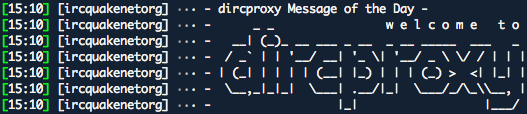
Installation of anything on text-based machines remains difficult. However, i hope this post will be of use to anyone out there. This short and incomplete guide helps you to to use dircproxy (a constant-online-tool for your constant-online-server) for IRC. Ingredients are macirssi, dircproxy and a linux box somewhere. Result: running macirrsi as you’ve always done, while always remaining online. Sounds good?
Although configuration options are limitless, most of the time you want to keep it simple. Here is the 4-step deal:
Installation of dircproxy
Installation of DircProxy for various common linux-platforms is a piece of cake. Just log into your machine and tell your package manager you want to use dircproxy. I can’t help you for that. But it might be something like:
apt-get install dircproxy
Telling dircproxy what servers to use
The dircproxy config file is located in your home directory: me@awesemebox:~# .dirproxyrc (where ~ is your home directory or username)
Dircproxy uses “connection classes”: little annoyances which we will get out of the way quickly. You need to know two things: the address of your server and a password. Server addresses are commonplace when connecting to an IRC server; therefore i’ll skip that subject and go straight to the password.
The password is something you create yourself. It is specified per connection: and has to be unique per connection. Just use something you’d remember, such as “OMFGQuakeNet” or something. This way you know what password belongs to what connection.
A strange thing with this password, is that it has to be stored “secure”. Therefore you have to run a script, accompanied with dircproxy that will convert your password into something unreadable. Try this:
dircproxy-crypt OMFGQuakeNet
Now specify your connection class at the bottom of the file. Like this:
connection {
server "irc.quakenet.org"
password "Go5XjCYTdnZOI"
}
That’s all. There is no need to specify channels, nicknames or any other thingy. You can leave your dircproxy configuration and log out of your unix machine. Or you could check out one of the gazillion options of the dircproxy configuration file and make it more secure. Whatever suits you best. I think i’m ready to connect macIrssi to the proxy. This will allow me to see what is going on in Quakenet.
Actually connecting to dircproxy
Configuring macIrssi is actually a two step process: the last remaining two steps. First you have to tell that you want to use a proxy. Second you have to add a password to your configuration file. I’m expecting you’re using macIrssi for quite a while, and connect to a lot of servers. You do not need to destroy or alter your configuration heavily.
Connecting to the proxy
While using macIrssi, type in the following commands in the console window.
That was the first step. You’ve just set you wanted to use a proxy (or dircproxy) or whatever. Its okey now and please forget about these settings. Please Quit MacIrssi and continue.
Joining servers and channels
While MacIrssi has a great graphical userinterface, it is has no edit field for proxy-server passwords. I expect this to be resolved in some next version. Untill then, we have to look at another dull text-screen for a while.
Your macirssi configuration file is located at ~/irssi/config (where ~ is your username or home directory)
Open the macIrssi configuration file in any text editor and you’re ready to make the final adjustment. Its just adding one single line to your Quakenet server configuration and you’re done.
A strange thing, here, is that you have to enter your password non-encrypted. Just make a “password = ” section in your server config for the aprorpiate server. Then add your password. Like so:
Save the file and lets check if it works. Start macIrssi. Just wait a few seconds and… you’re connected to your favorite channels using your own nickname and settings. Enjoy!
The Stitch Liveshow is a weekly broadcast playing different musical genres each time. It’s not live, not a show, not weekly, not broadcasted and Stitch is fictional. Follow the Stitch Liveshow on Twitter.
HARDSTYLE: a blend happy of melodies and beats at 150 bpm, with 56 seconds of intro, 8 bars filled with anticipation and instant party time. Every song features the same keyboard, effects but different kicks. Its a contest to squeeze as much bass and sound into a song. Selecting a variety of tracks is possible, even though the majority follows the same format and style.
Early hardstyle sucked beyond belief. Tracks tend to build up until, at the moment of climaxing, a break kicks in. And here is what happened to me: I started to prepare to dance again, shouting… but instead of the whole room going batshit insane everybody stood there watching as I went totally mad. AWKWARD! This not only happened to me, thats why the format changed probably.
Todays hardstyle is reliable. No more anti-climaxes, so you can actually dance to it and lose your mind. Because the majority of the tracks follow the same format, its actually easy to decide if you like it. Do you like one track? Then you’ll like em all. Still it was hard to select the right tunes: I don’t want my set to become boring, and I do want to have some sort of progression in my mix. That happened. Enjoy your hardstyle.
Total playing time: 2:35:23 (> two and a half hour, ^^ mixing and recording seemed like 5 minutes)
Download
uber fast Download: right click, save as. (sponsored by: vexocide.org)
The Stitch Liveshow is a ‘weekly’ show playing a different musical genre each ‘week’. Follow the Stitch Liveshow on Twitter.
Goa… a psychedelic version of trance. Continuous beats with psychedelic blurps and tweets. This really allows for hours and hours of mixing without noticing.
Artwork is taken from my tape-digitizing project; not the ones from Rave Radio since those where well preserved. I destroyed all covers and most of the plastic casings. So well, more pictures, audio fragments and backgrounds soon.
Mixing is damn good this time. I used a more patient technique which works great. Downside is that 80 minutes now hold just 19 tracks, instead of my regular 30. Goa doesn’t allow fast mixing, that would mean destroying the atmosphere. There are still about 500 tracks unchecked, which means another Goa mix soon.
Enjoy this set, its my best one yet.
Total playing time: 1:18:44
Download
uber fast Download: right click, save as. (sponsored by: vexocide.org)
It’s back. With smashing new covers that are suitable for work! Hit eXplosion delivers all hits of Januari 2010 in a single package. Download sites are hard to find (can’t host it myself due to its not my work, sorry) but can still pick it up from usenet. And even our usenet search engine has changed.
Deep insaneBASS and a great technical set; loud woofing speakers make both the ceiling and floor shake. No complaints from the neighbors, not loud enough…
We start off with some melodic dubstep, building towards low, deep and dark. At the end the power steps back in with ripping tunes. After brutal insanity some violent songs about guns and killing finish it off.
Dubstep is amazing. Don’t play this over any crappy stereo; blast this trough the largest set of speakers you’ve got lying around on maximum volume. When in doubt; also hook up your subwoofer from any surroundset in your neighborhood.
Fucking hell, this is the shit! My personal favorite is L-Wiz with Girl from Codeine City; the saxophone works magical. Next week something completely different, and hopefully as good as this. I’m gone… gotta snatch a trolley lol
Total playing time: 1:32:42
Download
Sponsor vexocide.org wants more traffic; please help it, and share this set.
uber fast Download: right click, save as. (sponsored by: vexocide.org)